What Is ARIA?
ARIA (Accessible Rich Internet Applications) is a set of attributes that give extra meaning to elements so assistive technologies can understand them. ARIA is most helpful when certain elements don’t behave like they normally would in HTML.
With ARIA, you can tell a screen reader what a custom element is supposed to do—its role, its name, and its current state.
Common ARIA Attributes
aria-label
Gives an accessible name when there is no visible label. Helpful for icon-only buttons (like a search icon or menu icon).
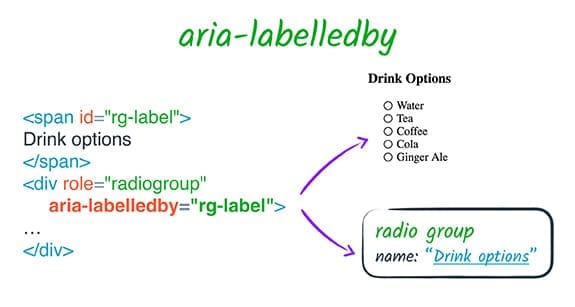
aria-labelledby
Points to another element that acts as the accessible label. This is better
than aria-label when you already have on-screen text.
aria-describedby
Connects an input or control to helper text (instructions, hints, or error messages). Screen readers announce this extra info automatically.
aria-hidden
Hides content from screen readers. Useful for decorative icons or duplicate text you don’t want to read twice.
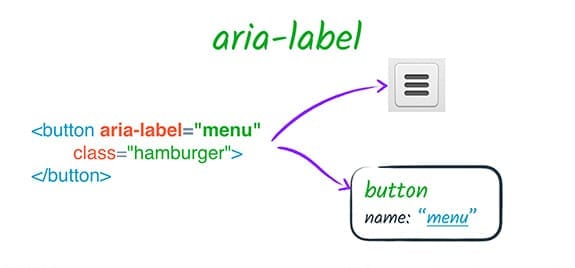
Example: Icon Button With ARIA
This button has no visible text, but screen readers can understand it because
of aria-label.
<button type="button" aria-label="Open navigation menu">
  <span aria-hidden="true">☰</span>
</button>
The aria-hidden="true" hides the decorative icon from
screen readers so they only announce “Open navigation menu.”
When Should You Use ARIA?
ARIA is powerful, but it should only be used when needed. Native HTML elements already have built-in accessibility that ARIA cannot improve.
- Use semantic HTML first whenever possible.
- Use ARIA only to fill gaps in custom widgets.
-
Never use ARIA to replace a native element (for example, don’t make a
<div>act like a button). - Test ARIA with a screen reader to confirm it helps, not hurts.